
How to Check Your MEPCO Bill Online?
If your MEPCO bill hasn’t arrived, or you’ve simply misplaced the paper copy, you don’t need to visit a MEPCO office to find out what you owe. You can look up your bill in under a minute using either your Reference Number or your Consumer ID. This page walks you through both methods, explains what each part of your bill means, and covers the services most people search for once they’ve found their bill amount. MEPCOBill.net is an independent website, not MEPCO.
Type your MEPCO BILL Reference Number or Customer ID
Two ways to check your MEPCO Bill Online:
MEPCO gives every connection two identifying numbers, and either one is enough to pull up your current bill.
Using your Reference Number: This 14-digit number is printed at the top left of any previous physical or digital bill, labelled “Reference No.” It’s the fastest way to pull up your current bill. This Reference number changes slightly at a specific time during the billing cycle.
Using your Consumer ID: Consumer ID (10 digits), tied permanently to your connection. It doesn’t change over time, which makes it useful to save somewhere once you’ve found it, especially if you manage a rental property or a commercial unit and don’t always have the latest paper bill on hand.
For example, a shop owner checking a commercial connection’s bill mid-month, before the paper copy is delivered, would typically rely on the Consumer ID rather than wait for a Reference Number from a bill that hasn’t arrived yet.

Once you enter either number, the result shows your units consumed for the current cycle, the meter reading date, the bill issue date, your payment record for the past 12 months, and the amount payable both before and after the due date.
In this video, consumers can see how they can quickly check their MEPCO bill online.
How to Check Your MEPCO Bill Without a Reference Number:
The front of your bill shows your 14-digit reference number, billing month, meter readings, and the total amount payable. The back of the bill lists information on electricity theft, overbilling, energy-saving tips, and peak/off-peak hours.


Estimate Your Bill Before It Arrives
Want to know roughly what you’ll owe before your official bill is generated? Use our Mepco bill calculator. Enter your expected monthly units and get an instant estimate. Note that your actual bill may vary slightly due to additional taxes applied to specific consumer categories.
Where MEPCO Operates:
MEPCO (Multan Electric Power Company) has served South Punjab since 1998, covering 15 districts through nine operational circles. For a full map of coverage areas, see our MEPCO Distribution Areas guide.
| Multan | Bahawalpur | Sahiwal | Khanewal |
| Muzaffar Garh | Lodhran | Pakpattan | Vehari |
| Rahim Yar Khan | Rajan Pur | Layyah | Bahawalnagar |
| Dera Ghazi Khan | Kot Addu | Taunsa |

What’s Actually Inside Your Bill:
A common question is why the final amount is bigger than “units used × rate.” That’s because your bill is built from several separate charges set by NEPRA and the government, not by MEPCO itself. Here’s what each one does:
Fuel Price Adjustment (FPA):
A monthly correction for the difference between the fuel cost MEPCO estimated and what it actually paid. It can raise or lower your bill depending on that month’s fuel prices.
General Sales Tax (GST):
General sales tax is charged as a percentage of your bill. The standard rate was 18% when we last checked. Your bill shows the exact rate.
Financial Cost Surcharge:
A per-unit surcharge charged to consumers other than lifeline users. Rates differ by consumer group, so check your bill.
Electricity duty:
A provincial duty. In 2025, the federal government announced it would stop collecting it through bills, so check whether it appears on your bill.
Income Tax:
Withheld at a rate that depends on your bill amount and tariff category; commercial and industrial consumers usually see higher rates than domestic ones.
Sales Tax:
Rates depend on your category and registration status; see your bill. Commercial users will pay 5% / 7% on bills up to Rs 20,000 or more.
Further Tax:
It charges 3% to all users with no Sales Tax Return Number, except domestic, agricultural, and the majority of users, and street light connections. Rates depend on your category and registration status; see your bill.
Extra Tax:
It is for commercial and industrial users (not registered on the FBR’s active taxpayer list) at 5%-17% across various bill amount slabs. Rates depend on your category and registration status; please check your bill.
PTV License Fee:
The GoP has abolished the PTV license fees.
For the complete breakdown of current rates by consumer category, see our MEPCO Tariff Rate guide. If your average consumption is below 200 units a month, check whether you qualify for a lower rate under our Protected vs Non-Protected Tariff guide.
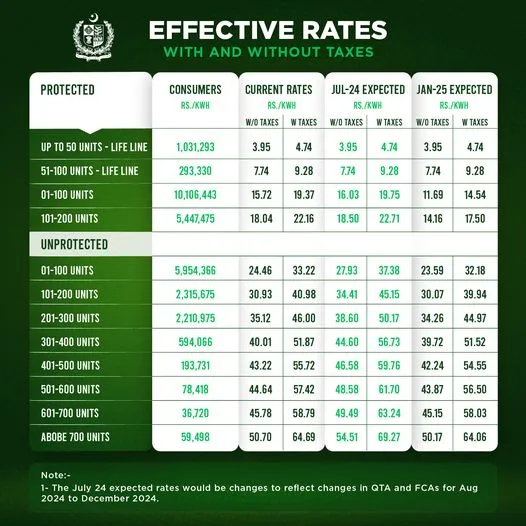
If your bill covers a partial billing cycle due to a new connection, disconnection, or meter change, see our Pro-Rata Billing to understand how the partial-month calculation works.
Beyond Bill Checking: Common MEPCO Requests
Beyond bill checking, MEPCO handles new connections, bill installment plans, due-date extensions, and complaint resolution. If you’re dealing with any of these, our guides cover the process:
New Connection or Change of Ownership:
Buying a property with an existing connection still in the previous owner’s name is more common than most people expect. The fix is the same process as applying for a brand-new connection, either through MEPCO’s ENC online portal or in person at your nearest Sub-Divisional Office.
Extending a Due Date
Missing a due date adds an LP (late payment) surcharge. If you need more time, different MEPCO officers can approve extensions depending on the bill amount, from a Deputy Manager Operations for smaller bills up to the CEO for larger ones. Your local Sub-Divisional Office is the right place to start this request.
MEPCO Bill Installment Procedure:
If a bill is too large to pay in one go, MEPCO allows installment plans, with the number of installments and approval authority depending on the amount and whether the connection is active or disconnected. If you want to know more about it, please visit our guide on Mepco Bill Installments.
Instant Billing Information:
You can access your bill through SMS registration or Email. You can access your bill details via SMS by typing pitc<space><14-digit reference number without space> and sending it to 8334.
To receive bills via Email, visit the nearest Sub-Divisional Office to enroll your Contact Number and Email ID.
Lowering Your Next Bill:
A few habits make a real difference in usage-heavy months, especially during summer:
Please see detailed tips for reducing your electricity bill.
To see how much each appliance uses, read our guide to reducing your MEPCO bill.
MEPCO Peak Hours by Season:
Mepco intends to decrease electricity consumption during peak hours to take advantage of off-peak tariff rates. This will also help reduce your electricity bill. Refer to the table below for Mepco’s peak electricity hours.
| Season | Peak Hours | Off-Peak Hours |
|---|---|---|
| December to February | 5 pm – 9 pm | Remaining 20 hours |
| March to May | 6 pm – 10 pm | Remaining 20 hours |
| June to August | 7 pm – 11 pm | Remaining 20 hours |
| September to November | 6 pm – 10 pm | Remaining 20 hours |

Install TOU/TOD Meter:
Consumers with a sanctioned load of 5 kW or more typically have a TOU/TOD meter that bills peak and off-peak usage at different rates. If your load is under 5 kW, you can apply to your local Subdivision to have one installed.

Safety Reminders from MEPCO:
Mepco announces official consumer safety reminders. Please read them carefully to avoid any loss.
Filing or Tracking a Complaint:
MEPCO’s Customer Complaint Management System (CCMS) lets you register and track issues online using your reference number, mobile number, or CNIC. You can also call the general helpline at 118 or SMS 8118. For load shedding, overbilling, or suspected electricity theft, your local Sub-Divisional office numbers are usually faster than the central line.

Register and Track Complaints:
Apna Meter Apni Reading
Electricity billing transparency is now in your hands. With the Government’s Power Smart App, you can record your own electricity usage and ensure accuracy in your bills. To learn how this works, check out our complete guide on Apna Meter Apni Reading
and take full control of your monthly consumption.
MEPCO Telephone Directory:
If you have an emergency or complaint about electricity, unexpected load shedding, or meter tracking, please call 0800-63726.
You can contact the Mepco Helpline or the numbers below to check your application status or report unexpected load shedding, load management, electricity cut-off, Mepco detection bill, overbilling, electricity theft, or any other concerns.
MEPCO Complaint Channels:
MEPCO online Contact #: 118
SMS @ 8118